
State of the Homelab 2026 (Network edition)
This is a follow-up post to my State of the Homelab 2026 (Servers Edition)-post, which talks about my storage / compute philosophy, how my server game has evolved over the years as well as what hardware I use as of January 2026.
Background
As with home computers utilised for “server stuff”, I have a history when it comes to networking which goes a little bit further than that of the average Internet user.
My very first router, after moving to my own place, was an Asus
RT-N66U. I think I struck gold with this
purchase, because unknowingly I bought a router that put me on open source and modding early on in my life. I only ran
the router as purchased for a couple of months after which I flashed it with
Tomato1. The main issue with this router was that
it was too slow. The apartment I lived in had a 1 000/1 000 Mbps Internet connection, but the poor router would not
push more than a couple of hundred Mbps. I don’t remember, but I doubt I got more than 250 Mbps over WiFi.
An upgrade was in order!
I already touched upon this upgrade in my previous post:
A couple of years later I built my first “home server” which mostly just acted as a router. I did however host a ZNC Bouncer and an OpenVPN Server.
More specifically, I built a Debian-based router on top of an Intel Celeron J1750 (IIRC). I don’t remember the specifications but I do remember that I powered it using a PicoPSU. Initially, I think I used the Asus router as an access point for WiFi, but I did install a network card with WiFi after a little while.
pfSense
In 2018 I had gotten tired of the Debian box.
After a lot of research I decided to build my own pfSense router. After additional research I decided that I did not want to build my own pfSense router and instead ended up buying a ready-made one. I did however not buy a Netgate router, but one based on a PC Engine APU2E4. I paired it with a Unifi AP AC Lite and that combo served me for more than five years with excellence.
I did not do much with respect to advanced network configuration, initially, but I did try both hosting VPN servers and routing all egress from my network via VPN just to see if it would work.2 All in all, pfSense has worked very well for me. I know that there have been controversies concerning Netgate (and I have considered moving to both OPNSense and UniFi, more than once) but since I use pfSense professionally I have not been able to motivate myself to make the migration.
Levelling up
After adopting pfSense and UniFi I have been focusing less on the hardware/software aspects of my network and more on its configuration. In particular, this concerns separating devices that connect to my network into tiers and ensuring proper isolation of lower-tier (less secure/trusted) devices from higher tier ones. I achieve this predominantly using VLANs, mDNS and regular firewall rules.
I have also abandoned OpenVPN. I had a very quick encounter with WireGuard, but I was never really able to get it to work the way I wanted it to. Instead, I have migrated all of my VPN use cases to Tailscale. (You can read more about this migration in this post.)
Current Setup
As of January 2026, I’m still running pfSense on my router together with pretty much only UniFi networking equipment. The image below outlines its configuration (click it!).
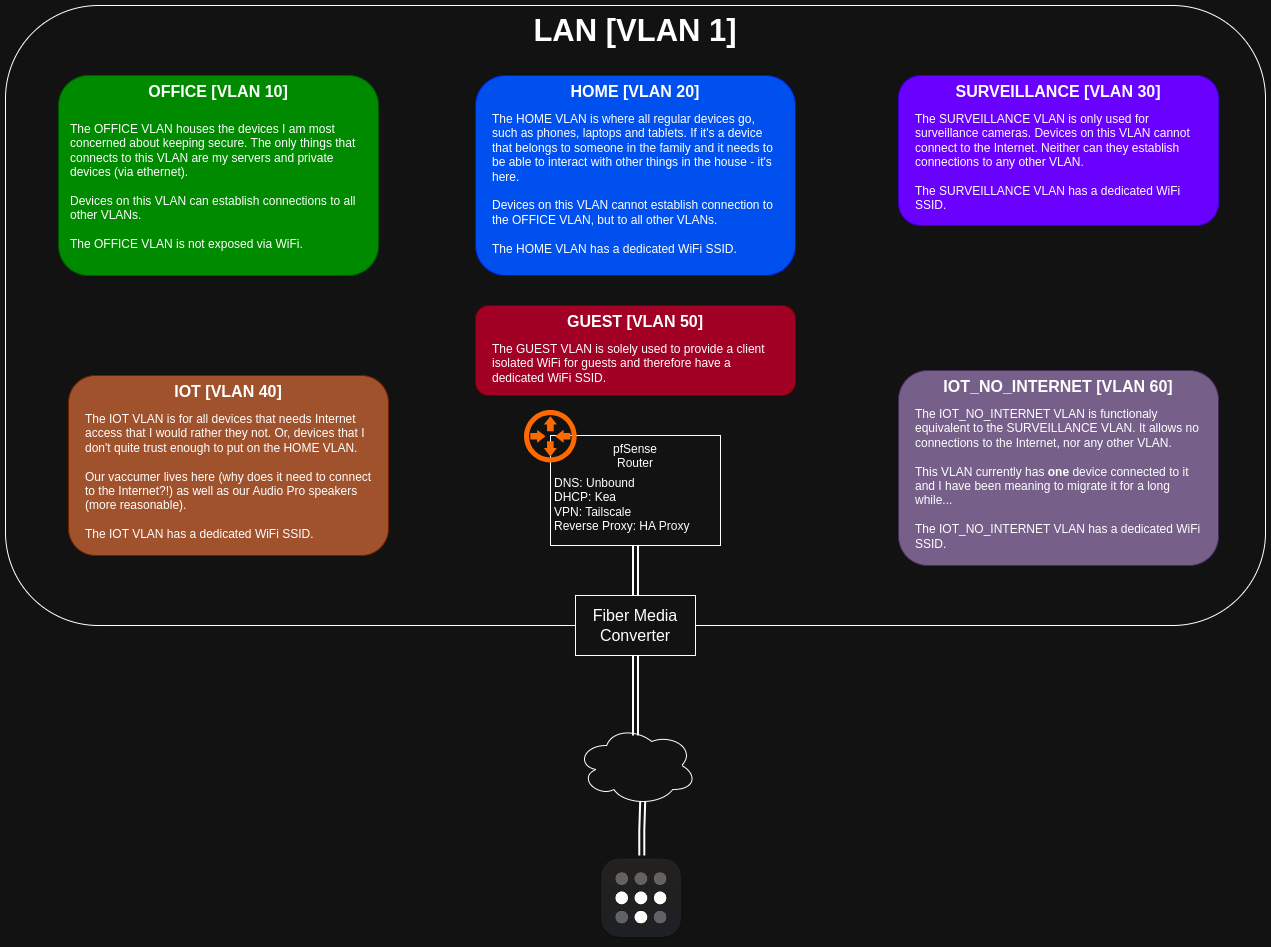
The gist of my networking philosophy is to have one VLAN per use case. I also tend to number them such that a lower
number indicates that the devices on that VLAN are more trustworthy. I must admit that this not really hold true for the
setup above, because I trust 30-60 equally little :P Let’s say the rust is: 10 | 20 | <the rest>.
Each VLAN has its own /24 IPv4 range and I have split them such that the first 100 addresses are statically assigned,
leaving the remaining addresses to be used for dynamic assignment via DHCP.
In addition to the above, I have two guiding lights that I try to keep in mind whenever I design a network:
(1) Difficult to shoot yourself in the foot
Above all, it should be difficult to do something that is outright bad!
There are two ways to connect to my network: (1) by plugging in a cable to a switch, and (2) by connecting to an SSID. I have RJ45 in pretty much every room in the house, but only the ones that are in active use are connected to my main switch. Additionally, only the ports on the switch that are in active use are enabled. This might sound like a pain to work with, but it forces me to be deliberate with every new device I plug in.
If it’s getting a cable, it needs a port, and the port needs to be enabled and configured accordingly.
Since I have distinct SSIDs for each WiFi network, the mental model is similar for wireless devices. Instead of connecting all devices to the same WiFi network and configure firewall rules for groups or specific devices, I can be sure that a new surveillance camera (connected to the surveillance WiFi) will absolutely not send any frames to anywhere.
(2) Observability
As mentioned earlier, each VLAN has its own IPv4 DHCP range and they are all coupled such that the third octet is the
same as the VLAN ID. This makes log inspection significantly easier, because as soon as I see 10.1.30.xxx I know that
I’m looking at a camera.
A remark, concerning hardware / software
A prerequisite for being able to manage a network like mine without going mad is to have a hardware and software stack that makes it easy to work with. As I wrote in the background section, I have been happily running pfSense + UniFi for more than five years and it has been working very well for me. There are a couple of things I dislike (like UniFi not allowing meshing if you have more than 4 SSIDs3) but overall I think it’s an excellent prosumer combo.
All networking equipment in my house lives on VLAN 1 and I use DHCP the same way on this VLAN as all the other ones.
If I were to start from scratch today, I would either go all in on UniFi or I would look into OPNSense. For my router that is. I still believe UniFi is the hands down best choice when it comes to switches. Having had a Zyxel managed switch (I used it together with the PC Engines router, for several years) I really, really, really, appreciate UniFi’s management tool. The Zyxel was dreadful.
Future improvements
I have mentioned it several times, but one last time: I would like to refactor my network such that I have fewer
VLANs/SSIDs. Merging SURVEILLANCE and IOT_NO_INTERNET would be a good first start and it would allow me to enable
UniFi Meshing. Merging IOT and GUEST is probably also feasible.
-
Which seems to be deprecated and archived. ↩
-
One of the things that did not work was Netflix. I just got an error message saying something to the effect of: “You’re using a VPN. Disable it and try again.” I even called Netflix customer service and asked for a list of IPs/domains so I could configure my network to not route those via the VPN. They refused and I ended up disabling the VPN for the sake of domestic peace. ↩
-
I have understood this to be more of a hardware problem than a software one. The number of (or the setup of the) radios in the access points simply cannot handle more than 4 SSIDs. This is one of several reasons that I want to refactor my network. ↩